
RadarGun-Baseball Pitch Speed2.1 - App Store
You'll be able to see results in few seconds.
Publisher Description

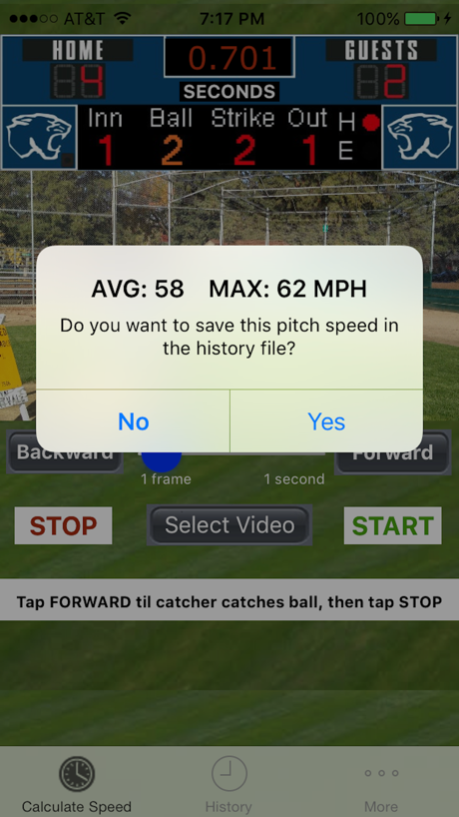
Slow-Mo and Zoom in this version
It calculates the average and maximum speed of a baseball with great accuracy using video frame-by-frame calculations. It is easy to use and it does not rely on the user’s reflexes to calculate the speed of the ball.
VERY ACCURATE
MyRadarGun can use slow motion video (frame-at-a-time) to calculate the time it takes for a ball to travel from the pitcher to the catcher. Knowing the distance, MyRadarGun accurately calculates the average and maximum speed of the ball, typically within +/- 1 MPH. Using slow motion, frame-at-a-time video with image zoom to calculate the speed of the ball is almost as accurate as using an expensive baseball radar gun at a fraction of the price.
EASY TO USE
Unlike most other baseball radar gun apps, where the user must tap a button when the ball is pitched and tap again when the ball is caught, with MyRadarGun the user only needs to take a video of the pitcher throwing the ball to a catcher. The video is then viewed one frame-at-a-time and the frame where the ball leaves the pitcher’s hand and the frame where the ball enters the catcher’s mitt are identified. The user can zoom in and out and backup and go forward one frame-at-a-time until the exact frame where the ball leaves the pitcher’s hand and the exact frame where the catcher catches the ball are identified.
FOR USE BY PITCHERS OR THE COACH
MyRadarGun can save the average and maximum speed of any number of pitches along with the pitcher’s name, jersey number, date and time. The speeds can be used to compare different potential pitchers or determine the pitcher’s speed using different pitching techniques. The speeds can also be used to evaluate a pitcher’s speeds over time. A coach can use the app during a game to evaluate how the pitcher is doing in real-time. Knowing how the pitcher is doing can be used to determine if the pitcher should be changed. The coach can even determine the speed of the opposing teams pitchers.
FEATURES & BENEFITS
- Accurate speed determination
- Average and maximum speeds
- Doesn’t require good reflexes
- Supports SLO-MO video
- Allows zooming in on video
- Embedded with helpful messages
- Pitchers identified by name & number
- Multiple throws saved per pitcher
- Multiple pitchers speeds saved
- Sorted by pitcher name and date
- Any throw distance can be used
- Reports speed in MPH or KPH
- Complete instructions included
Sep 24, 2017
Version 2.1
This app has been updated by Apple to display the Apple Watch app icon.
Fix bug with iOS 11 where video does not display due to authorization Issue.
About RadarGun-Baseball Pitch Speed
The company that develops RadarGun-Baseball Pitch Speed is Robert Wohnoutka. The latest version released by its developer is 2.1.
To install RadarGun-Baseball Pitch Speed on your iOS device, just click the green Continue To App button above to start the installation process. The app is listed on our website since 2017-09-24 and was downloaded 0 times. We have already checked if the download link is safe, however for your own protection we recommend that you scan the downloaded app with your antivirus. Your antivirus may detect the RadarGun-Baseball Pitch Speed as malware if the download link is broken.
How to install RadarGun-Baseball Pitch Speed on your iOS device:
- Click on the Continue To App button on our website. This will redirect you to the App Store.
- Once the RadarGun-Baseball Pitch Speed is shown in the iTunes listing of your iOS device, you can start its download and installation. Tap on the GET button to the right of the app to start downloading it.
- If you are not logged-in the iOS appstore app, you'll be prompted for your your Apple ID and/or password.
- After RadarGun-Baseball Pitch Speed is downloaded, you'll see an INSTALL button to the right. Tap on it to start the actual installation of the iOS app.
- Once installation is finished you can tap on the OPEN button to start it. Its icon will also be added to your device home screen.
Program Details
System requirements
Download information
Pricing
Version History
version 2.1
posted on 2017-09-24
Sep 24, 2017 Version 2.1
This app has been updated by Apple to display the Apple Watch app icon.
Fix bug with iOS 11 where video does not display due to authorization Issue.
version 2.1
posted on 2017-09-24
Sep 24, 2017 Version 2.1
Fix bug with iOS 11 where video does not display due to authorization Issue.
version 2.1
posted on 2017-09-24
Sep 24, 2017 Version 2.1
This app has been updated by Apple to use the latest Apple signing certificate.
Fix bug with iOS 11 where video does not display due to authorization Issue.
version 1.1
posted on 2013-12-18
version 2.1
posted on 1970-01-01
2017年9月24日 Version 2.1
This app has been updated by Apple to use the latest Apple signing certificate.
Fix bug with iOS 11 where video does not display due to authorization Issue.
version 2.1
posted on 1970-01-01
2017년 9월 24일 Version 2.1
Fix bug with iOS 11 where video does not display due to authorization Issue.
Disclaimer
Official App Store Link
We do not host RadarGun-Baseball Pitch Speed on our servers. We did not scan it for viruses, adware, spyware or other type of malware. This app is hosted by Apple and passed their terms and conditions to be listed there. We recommend caution when installing it.
The App Store link for RadarGun-Baseball Pitch Speed is provided to you by apps112.com without any warranties, representations or guarantees of any kind, so access it at your own risk.
If you have questions regarding this particular app contact the publisher directly. For questions about the functionalities of apps112.com contact us.
